processed_regional_data <- my_data %>%
  mutate(newPercentageColumn = (numberColumn / totalPopulationColumn) * 100) %>%
  rename(newPercentageColumn = percentageRate,
         numberColumn = number,
         totalPopulationColumn = population) %>%
  clean_names() %>%
  remove_empty() %>%
  filter(geographic_level == "Regional") %>%
arrange(time_period, region_name)Writing code
Writing code is our second core RAP principle, and is made up of the following elements:
- Processing is done with code
- Use appropriate tools
- Whole pipeline can be run from a single script or workflow
- Dataset production scripts
- Recyclable code for future use
- Clean final code
- Peer review of code
- Peer review of code from outside the team
- Automated high-level checks
- Publication specific automated sense checks
- Automated reproducible reports
- Publication specific automated summaries
Tip
The key thing to remember is that we should be automating everything we can, and the key to automation is writing code. Using code is as simple as telling your computer what to do. Code is just a list of instructions in a language that your computer can understand. We have links to many resources to help you learn to code on our learning support page.
Processing is done with code

What does this mean?
All extraction, and processing of data should be done using code, avoiding any manual steps and moving away from a reliance on Excel, SPSS, and other manual processing. In order to carry out our jobs to the best of our ability it is imperative that we use the appropriate tools for the work that we do.
Even steps such as copy and pasting data, or pointing and clicking can introduce risks of manual error, and these risks should be minimised by using code to document and execute these processes instead.
Why do it?
Using code brings numerous benefits. Computers are far quicker, more accurate, and far more reliable than humans in many of the tasks that we do. Writing out these instructions saves us significant amounts of time, particularly when code can be reused in future years, or even next week when one specific number in the source file suddenly changes. Code scripts also provide us with editable documentation for our production processes, saving the need for writing down information in extra documents.
Reliability is a huge benefit of the automation that RAP brings - when your data has to be amended a week before publication, it’s a life saver to know that you can re-run your process in minutes, and reassuring to know that it will give you the result you want. You can run the same code 100 times, and be confident that it will follow the same steps in the same order every single time. You should ensure that any last-minute fixes to the process are written in the code and not done with manual changes.
How to get started
See our learning resources for a wealth of resources on Databricks and R to learn the skills required to translate your process into code.
Your data should be stored in Databricks, and you can do a lot of your data processing there using different coding languages, including Spark SQL, Python, and R. You may however find it easier to do some or all of your data processing in RStudio, particularly if you are more familiar with R than other coding languages. If you want to do your data processing in RStudio, you can connect to Databricks using a personal cluster with RStudio and ODBC / DBI. This allows you to read data directly from Databricks into RStudio and process it there.
Processing data in Databricks
To get started in Databricks, take a look at the ADA and Databricks fundamentals pages. These pages contains links to a variety of resources to help you get started with Databricks, including sections on working with data and code.
Tidying and processing data in R
If you want to do your data processing in R, you can connect to Databricks using a personal cluster with RStudio and ODBC / DBI. This allows you to read data directly from Databricks into R and process it there.
Here is a video of Hadley Wickham talking about how to tidy your data to these principles in R. This covers useful functions and how to complete common data tidying tasks in R. Also worth taking a look at applied data tidying in R, by RStudio.
Using the %>% pipe in R can be incredibly powerful, and make your code much easier to follow, as well as more efficient. If you aren’t yet familiar with this, have a look at this article that provides a useful beginners guide to piping and the kinds of functions you can use it for. The possibilities stretch about as far as your imagination, and if you have a function or task you want to do within a pipe, googling ‘how do I do X in dplyr r’ will usually start to point you in the right direction, alternatively you can contact us, and we’ll be happy to help you figure out how to do what you need.
A quick example of how powerful this is is below. The pipe operator passes the outcome of each line of code onto the next, so you can complete multiple steps of data manipulation in one section of code instead of writing separate steps for each one. In this code, we:
- start with my_data
- calculate a percentage column using mutate
- rename the percentage column we created to “newPercentageColumn”, rename “number” to “numberColumn”, and rename “population” to “totalPopulationColumn”
- use the
clean_names()function from the janitor package to ensure that columns have consistent naming standards - use the
remove_empty()function from the janitor package to remove any rows and columns that are composed entirely of NA values - filter the dataframe to only include Regional geographic level data
- order the dataframe by time period and region name
Helpful new functions in the tidyverse packages can help you to easily transform data from wide to long format, as well as providing you with tools to allow you quickly and efficiently change the structure of your variables.
For further resources on learning R so that you’re able to apply it to your everyday work, have a look at the learning resources page.
Use appropriate tools
What does this mean?
Using the recommended tools on our learning page (Databricks, R and Git), or other suitable alternatives that allow you to meet the RAP for statistics or RAP for analysis principles.
With the department moving to Databricks for data storage, you can now write your code directly within the Databricks platform (in any available language, including Spark SQL, R and Python). If you prefer to write code in RStudio, you can connect to Databricks using a personal cluster with RStudio and ODBC / DBI. This allows you to read data directly from Databricks into RStudio and process it there.
Ideally any tools used would be open source, Python is a good example of a tool that would also be well suited, though is less widely used in DfE and has a steeper learning curve than R.
Open-source refers to something people can modify and share because its design is publicly accessible. For more information, take a look at this explanation of open-source, as well as this guide to working in an open-source way. In practical terms, this means moving away from the likes of SPSS, SAS and Excel VBA, and utilising the likes of R or Python, version controlled with Git, and hosted in a publicly accessible repository.
Why do it?
There are many reasons why we have recommended the tools that we have, the recommended tools are:
- already in use at the department and easy for us to access
- easy and free to learn
- designed for the work that we do
- used widely across data science in both the public and private sector
- allow us to meet best practice when applying RAP to our processes
How to get started
Go to our learning page to read more about the recommended tools for the jobs we do, as well as looking at the resources available there for how to build capability in them. Always feel free to contact us if you have any specific questions or would like help in understanding how to use those tools in your work.
By following our guidance in saving versions of code in an Azure DevOps, we will then be able to mirror those repositories in a publicly available GitHub area.
Whole pipeline can be run from a single script or workflow

What does this mean?
The ultimate aim is to utilise a single script or workflow to document and run off everything for a publication or piece of analysis including the data files, any QA and any summary reports. This script or workflow should allow you to run individual outputs by themselves as well, so make sure that each data file can be run in isolation by running single lines of this script. All quality assurance for a file is also included in the single script that can be used to create a file from source data (see the dataset production scripts section for RAP for statistics.)
Why do it?
This carries all of the same benefits as having a single ‘run’ script for a file, but at a wider publication or analysis level, effectively documenting the entire process in one place. This makes it easier for new analysts to pick up the process, as well as making it quicker and easier to rerun as all reports relating to that file are immediately available if you ever make changes file.
Using ‘run’ scripts and workflows
Utilising a single ‘run’ script or workflow to execute processes written in other scripts brings a number of benefits. It isn’t just about removing the need to manually trigger different code scripts to get the outputs, but it means the entire process, from start to finish, is fully documented in one place. This has a huge number of benefits, particularly for enabling new team members to pick up existing work quickly, without wasting time struggling to understand what has been done in the past.
Connecting R to Databricks
In order to create a single script to run all processes from, you may need to connect to Databricks from RStudio. If you are unsure how to do this, take a look at the guidance on creating a personal cluster with RStudio and ODBC / DBI. This allows you to read data directly from Databricks into RStudio and process it there.
Dataset production scripts

What does this mean?
Each dataset can be created by running a single script, which may ‘source’ multiple scripts within it. This does not mean that all of the code to create a file must be written in a single script, but instead that there is a single ‘create file’ or ‘run’ script that sources every step in the correct order such that every step from beginning to end will be executed if you run that single ‘run’ script.
This ‘run’ script should take the source data right through to final output at the push of a button, including any manipulation, aggregation, suppression etc.
Why do it?
Having a script that documents the whole process for this saves time when needing to rerun processes, and provides a clear documentation of how a file is produced.
How to get started
Review your current process - how many file scripts does it take to get from source data to final output, why are they separated, and what order should they be run in? Do you still have manual steps that could introduce human error (for example, manually moving column orders around in excel)?
You should automate any manual steps such as the example above. If it makes sense to, you could combine certain scripts to reduce the number. You can then write code in R to execute your scripts in order, so you are still only running one script to get the final output.
Recyclable code for future use
What does this mean?
It’s good practice when writing code to always write it with your future-self in mind. Alongside writing neat & well documented/commented code, this also means writing code that can be easily re-used in future, i.e. writing functions with arguments for variables that are likely to change (like year) rather than hard-coding them.
Even if you are working on a one-off project or piece of analysis, you might want to re-use chunks or sections, or others might want to run iterations in the future. This is also applicable to common questions your team receives (I.e. PQs and FOIs - can you create some re-usable code with interchangeable arguments for these?)
We have already stated that RAP should be proportional, and this is also true here. If you have a really tight deadline or it’s a super short, simple piece of analysis, this might not be needed, however, it’s always good to embed these best-practices into our default ways of working!
Why do it?
One huge benefit that comes with using code in our processes, is that we can pick them up in future and reuse with minimum effort, saving us huge amounts of resource. To be able to do this, we need to be conscious of how we write our code, and write it in a way that makes it easy to use in future.
How to get started
Review your code and consider the following:
- What steps might need re-editing or could become irrelevant?
- Can you move all variables that require manual input (e.g. table names, years) to be assigned at the top of the code, so it’s easy to edit in one place with each iteration?
- Are there any fixed variables that are prone to changing such as geographic boundaries, that you could start preparing for changes now by making it easy to adapt in future?
For example, if you refer to the year in your code a lot, consider replacing every instance with a named variable, which you only need to change once at the start of your code. In the example below, the year is set at the top of the code, and is used to define “prev_year”, both of which are used further down the code to filter the data based on year.
this_year <- 2020
prev_year <- this_year - 1

data_filtered <- data %>%
  filter(year == this_year)

data_filtered_last_year <- data %>%
  filter(year == prev_year)
Standards for coding
Code can be written in many different ways, and in languages such as R, there are often many different functions and routes that you can take to get to the same end result. On top of that, there are even more possibilities for how you can format the code. This section will take you through some widely used standards for coding to help bring standardisation to this area and make it easier to both write and use our code.
Clean final code
What does this mean?
This code should meet the best practice standards below (for SQL and R). If you are using a different language, such as Python, then contact us for advice on the best standards to use when writing code.
There should be no redundant or duplicated code, even if this has been commented out. It should be removed from the files to prevent confusion further down the line.
The only comments left in the code should be those describing the decisions you have made to help other analysts (and future you) to understand your code. More guidance on commenting in code can be found later on this page.
Why do it?
Clean code is efficient, easy to write, easy to review, and easy to amend for future use. Below are some recommended standards to follow when writing code in SQL and R.
How to get started
Watch this coffee and coding session introducing good code practice, which covers:
- key principles of good code practice
- writing and refining code to make it easier to understand and modify
- a real-life example of code improvement from within DfE
Then you should also watch the follow up intermediate session, which covers:
- version control
- improving code structure with functions
- documentation and Markdown
- interactive notebooks
Clean code should include comments. Comment why you’ve made decisions, don’t comment what you are doing unless it is particularly complex as the code itself describes what you are doing. If in doubt, more comments are better than too few though. Ideally any specific comments or documentation should be alongside the code itself, rather than in separate documents.
SQL in Databricks
For guidance on writing Spark SQL code in Databricks, take a look at the ADA guidance site. This walks you through how to create a construct a SQL query in the SQL editor in the Databricks platform.
You may choose to use Notebooks to write your SQL code in Databricks. If so, take a look at the ADA using R, Python and SQL in Databricks guidance.
If you have code that was written in T-SQL (for example in SSMS), you may need to make some adjustments to the code to get it to run in Spark SQL. Take a look at the what this means for exisitng code section on the ADA page for help with this.
R
When using R, it is generally best practice to use R projects as directories for your work.
The recommended standard for styling your code in R is the tidyverse styling, which is fast becoming the global standard. What is even better is that you can automate this using the styler package, which will literally style your code for you at the click of a button, and is well worth a look.
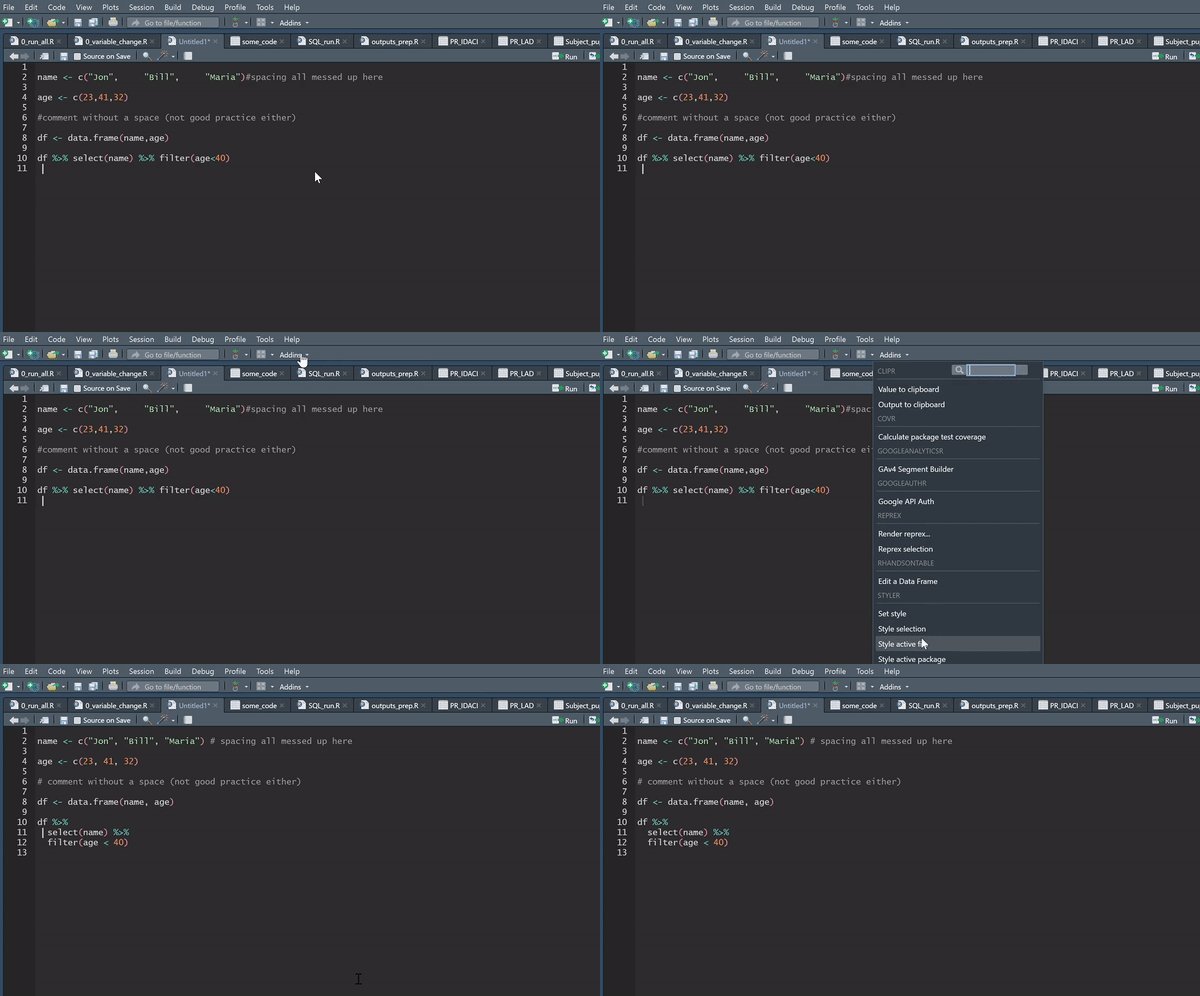
There is also plenty of guidance around the internet for best practice when writing efficient R code.
To help you standardise your code further, you can make use of the functions contained within our dfeR package. The package includes functions to standardise formatting and rounding, to pull the latest ONS geography lookups, and to create a pre-populated folder structure, amongst many other things.
HTML
If you ever find yourself writing HTML, or creating it through RMarkdown, you can check your HTML using W3’s validator.
Peer review of code
Note
‘Testing by a second analyst’ is part of the DfE Mandatory QA checklist.
What does this mean?
Peer review is an important element of quality assuring our work. We often do it without realising by bouncing ideas off of one another and by getting others to ‘idiot check’ our work. When writing code, ensuring that we get our work formally peer reviewed is particularly important for ensuring it’s quality and value. The Duck Book and Tidyteam contain detailed guidance on peer review, but we have summarised some of the information here for you as well.
Prior to receiving code for peer review, the author should ensure that all code files are clean, commented appropriately and for larger projects should be held in a repo with an appropriate README file.
You should check:
Is someone else in the team able to generate the same outputs?
Has someone else in the team reviewed the code and given feedback?
Have you taken on their feedback and improved the code?
Why do it?
There are many benefits to this, for example:
Ensuring consistency across the team
Minimizing mistakes and their impact
Ensuring the requirements are met
Improving code performance
Sharing of techniques and knowledge
How to get started
When peer reviewing code you should consider the following questions -
- Do you understand what the code does? If not, is there supporting documentation or code comments that allow you to understand it?
- Does the code do what the author intended?
- Have any dependencies (either on separate pieces of code, data files, or packages) been documented?
- Are there any tests / checks that could be added into the code that would help to give greater confidence that it is doing what it is intended to?
- Are there comments explaining why any decisions have been made?
- Is the code written and structured sensibly?
- Are there any ways to make the code more efficient (either in number of lines or raw speed)? Is there duplication that could be simplified using functions?
- Does the code follow best practice for styling and structure?
- Are there any other teams/bits of code you’re aware of that do similar things and would be useful to point the authors towards?
- At the end of the review, was there any information you needed to ask about that should be made more apparent in the code or documentation?
Depending on your access you may or may not be able to run the code yourself, but there should be enough information within the code and documentation to be able to respond to the questions above. If you are able to run the code, you could also check -
- Does the code run without errors? If warnings are displayed, are they explained?
- If the project has unit/integration tests, do they pass?
- Can you replicate previous output using the same code and input data?
If you would like a more thorough list of questions to follow, then the Duck Book has checklists available for three levels of peer review, based on risk:
If you’re unfamiliar with giving feedback on someone’s code then it can be daunting at first. Feedback should always be constructive and practical. It is recommended that you use the CEDAR model to structure your comments:
Context - describe the issue and the potential impact
Examples - give specific examples of when and where the issue has been present (specifying the line numbers of the code where the issue can be found can be useful here)
Diagnosis - use the example to discuss why this approach was taken, what could have been done differently and why alternatives could be an improvement
Actions - ask the person receiving feedback to suggest actions that they could follow to avoid this issue in future
Review - if you have time, revisit the discussion to look for progress following on from the feedback
Other tips for getting started with peer review can be found in the Duck Book
The Duck Book also contains some helpful code QA checklists to help get you thinking about what to check
Improving code performance
Peer reviewing code and not sure where to start? Improving code performance can be a great quick-win for many production teams. There will be cases where code you are reviewing does things in a slightly different way to how you would: profiling the R code with the microbenchmark package is a way to objectively figure out which method is more efficient.
For example below, we are testing out case_when, if_else and ifelse.
microbenchmark::microbenchmark(
   case_when(1:1000 < 3 ~ "low", TRUE ~ "high"),
   if_else(1:1000 < 3, "low", "high"),
   ifelse(1:1000 < 3, "low", "high")
)
Running the code outputs a table in the R console, giving profile stats for each expression. Here, it is clear that on average, if_else() is the fastest function for the job.
Unit: microseconds
                                         expr     min       lq     mean   median       uq      max neval
 case_when(1:1000 < 3 ~ "low", TRUE ~ "high") 167.901 206.2510 372.7321 300.2515 420.1005 4187.001   100
           if_else(1:1000 < 3, "low", "high")  55.301  74.0010 125.8741 103.7015 138.3010  538.201   100
            ifelse(1:1000 < 3, "low", "high") 266.200 339.4505 466.7650 399.7010 637.6010  851.502   100
Peer review of code from outside the team
What does this mean?
Has someone from outside of the team and publication or analysis area reviewed the code and given feedback?
Have you taken on their feedback and improved the code?
Why do it?
All of the benefits you get from peer reviewing within your own team, multiple times over. Having someone external offers new perspectives, holds you to account by breaking down assumptions, and offers far greater opportunity for building capability through knowledge sharing.
How to get started
While peer reviewing code within the team is often practical, having external analysts peer review your code can bring a fresh perspective. If you’re interested in this, please contact us, and we can help you to arrange someone external to your team to review your processes. For this to work smoothly, we recommend that your code is easily accessible for other analysts, such as hosted in an Azure DevOps repo and mirrored to GitHub.
Automated high level checks
What does this mean?
Any data files or analysis that has been created will need to be quality assured. These checks should be automated where possible, so the computer is doing the hard work - saving us time, and to ensure their reliability. It is assumed that when using R, automated scripts will output .html reports that the team can read through to understand their data and identify any issues, and save as a part of their process documentation.
For more information on general quality assurance best practice in DfE, see the How to QA guide. The list of basic automated QA checks, with code examples can be found below and in our GitHub repository, including checking for minimum, maximum and average values, extreme values and outliers, duplicate rows and columns, geographical subtotal checks, and basic trend analysis using scatter plots.
The Statistics Development Team have developed the QA app to include some of these basic QA outputs.
Why do it?
Quality is one of the three pillars that our code of practice is built upon. These basic level checks allow us to have confidence that we are accurately processing the data.
Automating these checks ensures their accuracy and reliability, as well as being dramatically quicker than doing these manually.
How to get started
Try using our template code snippets to get an idea of how you could automate QA of your own publication files. A recording of our introduction to automated QA is also available at the top of the page.
Publication/project specific automated sense checks
What does this mean?
The QA team have put together a flowchart to help you identify the QA needed in different scenarios. When it’s proportional to the work, QA should go further than the most basic/generic checks above. In these cases, it is expected that teams develop their own automated QA checks to QA specificities of their analysis not covered by the basic checks.
As a part of automating QA, we should also be looking to automate the production of summary statistics. This provides us with instant insight into the stories underneath the numbers. Summary outputs are automated and used to explore the stories of the data.
Why do it?
Quality is one of the three pillars that our code of practice is built upon. By building upon the basic checks to develop bespoke QA for our publications, we can increase our confidence in the quality of the processes and outputs that they produce.
How to get started
We expect that the basic level of automated QA will cover most generic needs. However, we also expect that each analytical project will have it’s own quirks that require a more bespoke approach. Try to consider what things you’d usually check as flags that something hasn’t gone right with your data. What are the unique aspects of your project’s data, and how can you automate checks against them to give you confidence in it’s accuracy and reliability?
For those who are interested in starting writing their own QA scripts, it’s worth looking at packages in R such as testthat, including the coffee and coding resources on it by Peter Curtis, as well as this guide on testing by Hadley Wickham.
The janitor package in R also has some particularly useful functions, such as clean_names() to automatically clean up your variable names, remove_empty() to remove any completely empty rows and columns, and get_dupes() which retrieves any duplicate rows in your data - this last one is particularly powerful as you can feed it specific columns and see if there’s any duplicate instances of values across those columns.
Automated reproducible reports
What does this mean?
As a part of automating QA, we should also be looking to automate the production of summary statistics alongside the tidy underlying data files or analysis where applicable, this then provides us with instant insight into the stories underneath the numbers.
Summary outputs are automated and used to explore the stories of the data.
For data that is to be published on EES, the Statistics Development Team have developed the QA app to include some of these automated summaries, including minimum, maximum and average summaries for each indicator.
At a basic level we want teams to make use of the QA app explore their data:
Have you used the outputs of the automated QA from the screener to understand the data?
Run automated QA, ensure that all interesting outputs/trends are reflected in the accompanying text
Why do it?
Value is one of the three pillars of our code of practice. Even more specifically it states that ‘Statistics and data should be presented clearly, explained meaningfully and provide authoritative insights that serve the public good.’.
As a result, we should be developing automated summaries to help us to better understand the story of the data and be authoritative and rigorous in our telling of it.
How to get started
Consider:
Use the additional tabs available after a data file passes the data screener as a starting point to explore trends across breakdowns and years.
Running your publication or analysis specific automated QA, ensuring that all interesting outputs/trends are reflected in any accompanying text
Publication specific automated summaries
What does this mean?
Have you gone beyond the outputs of the QA app to consider automating further insights for your publication specifically? E.g. year on year changes for specific measures, comparisons of different characteristics that are of interest to the general public
Are you using these outputs to write your commentary?
Why do it?
All publications are different, and therefore it is important that for each publication, teams go beyond the basics and produce automated summaries specific to their area.
How to get started
Consider:
Integrating extra publication-specific QA into the production process
Consider outputs specific to your publication that would help you to write commentary/draw out interesting analysis